The Invoice Generator
You've secured your first freelance client! But now comes the hard part: getting paid.
The Problem: Every time you bill a client, you manually calculate the subtotal, apply the local tax rate, format it nicely, and hope you didn't make a math error. If you have 50 clients, this is a nightmare. The Goal: Let's build a Blueprint (Class) for invoices. This encapsulates the business logic inside an object, guaranteeing consistent, error-free receipts every single time.
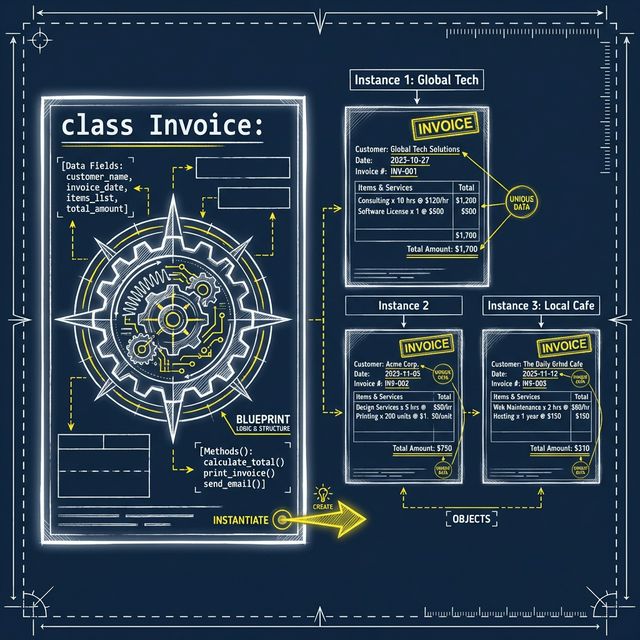
By moving the logic into a Class, the person using your code (which might be you next week) doesn't need to know how to calculate tax. They just call invoice.set_tax_rate(0.1) and invoice.generate(), and the Invoice Object handles the rest internally!
Your Final Challenge
This isn't just an exercise; it's your graduation project. You will complete the Invoice class implementation, test it by instantiating it, and feed it data from orders.csv—combining everything you've learned in this series!
Complete the __init__(self, client_name) method. It should save the client_name. It also needs to create an empty list called self.items and set self.tax_rate to 0.0.
Complete add_item(self, name, price). It should .append() a tuple (name, price) into the self.items list.
Complete set_tax_rate(self, rate). Update self.tax_rate.
Complete generate(self).
Loop through self.items and sum up the prices to get the subtotal.
Calculate tax, then total, and return total.
Scroll to the bottom of the code. Instantiate your class: my_invoice = Invoice("Global Tech Corp").
Use File I/O (with open("orders.csv", "r") as file:) to read the orders. Skip the header row. For every remaining line, split by commas, convert the price to a float(), and use my_invoice.add_item() to store the data inside your object!
Set the tax rate to 0.1 (10%) and call .generate(), saving the returned value to the final_amount variable.
Suggested SolutionExpandCollapse
This is what professional software engineering looks like. You create reusable objects that handle their own complex behaviors, and feed them raw data from the outside world!
class Invoice:
  def __init__(self, client_name):
      self.client_name = client_name
      self.items = []
      self.tax_rate = 0.0

  def add_item(self, name, price):
      self.items.append((name, price))

  def set_tax_rate(self, rate):
      self.tax_rate = rate

  def generate(self):
      subtotal = 0
      print(f"--- INVOICE FOR: {self.client_name} ---")

      for name, price in self.items:
          print(f"- {name}: ${price}")
          subtotal += price

      tax = subtotal * self.tax_rate
      total = subtotal + tax

      print(f"\nSubtotal: ${subtotal:.2f}")
      print(f"Tax:      ${tax:.2f}")
      print(f"Total:    ${total:.2f}")
      print("---------------------------------")
      return total

# --- CAPSTONE IMPLEMENTATION ---

# Instantiate the class
my_invoice = Invoice("Global Tech Corp")

# Read external CSV data into the object
with open("orders.csv", "r") as file:
  lines = file.readlines()
  for line in lines[1:]: # Skip the header
      item_name, price_str = line.strip().split(",")
      my_invoice.add_item(item_name, float(price_str))

# Calculate & Generate
my_invoice.set_tax_rate(0.1)
final_amount = my_invoice.generate()